Upgrade your K2 Plus 3D printer with the R3men Graphite Bed for improved print quality and adhesion. This installation guide provides a walk through of the process, helping you to successfully install and start using your new graphite bed for optimal 3D printing results.
Part Referenced: Graphite Bed for K2 Plus
TABLE OF CONTENTS
Build Plate Alignment Corners
We suggest printing out the build sheet alignment corners prior to installation. Use high-temp materials such as PA6-CF, PA12-CF, PC, PC-CF, or better
Attention:
Scratched Magnet
If you see this kind of scratches on the magnet, it doesn't mean that it was damaged or used! It means, the magnet had imperfections and after taking a mesh, we helped you sanding it to make it flatter.
230v
If your voltage is 230v, then isolate and do not connect the wire for 115v, otherwise it may cause issues with the heater and relay.
Installation Instructions:
Follow the official Creality video with a few different steps below
220V Connection:
1. Connect 2 white wires to N and 220B slots on SSR. Connect the yellow grounding wire to SSR (grounding wire has a ring terminal).
2. Isolate and DO NOT connect the 110v yellow wire.
3. Connect thermistor to the mainboard.

110V Connection:
1. Connect 110v yellow wire (fork teminal) to N slot, connect 2 white wires together to 110B slot on SSR. Connect the yellow grounding wire to SSR (grounding wire has a ring terminal).
2. Connect thermistor to the mainboard.

Rigid bed mounts
If you use stock bed probe (PRTouch) then use metal standoffs with M4*30 bolts.

Mounting method
Use the same exact mounting method that is used for the stock bed: stock bolts with knobs + stock metal spacers + stock springs.
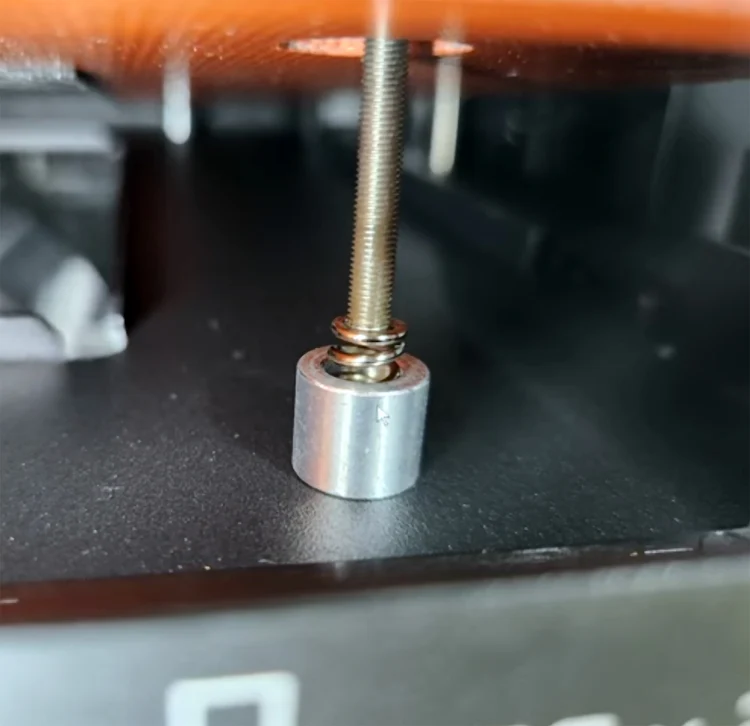
Springs and knobs
If you use cartographer or other Eddy sensor bed probes, then you may use springs with M4*40 bolts with bed knobs for easy bed leveling using screw tilt adjust. You may buy the bed knobs or print the knobs from Printables.

Firmware:
Thermistor type
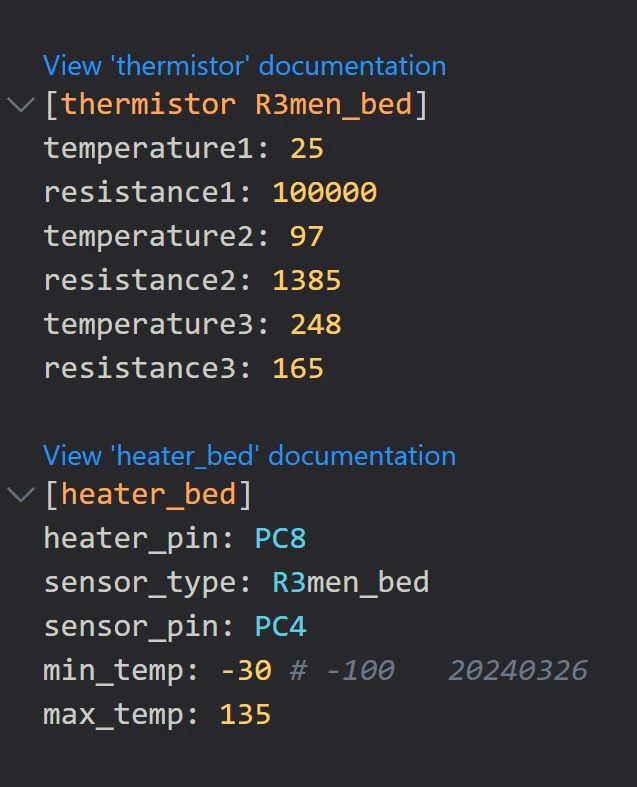
You need to make changes in printer.cfg file. Find heater_bed section and change senosr type to "sensore_type: Generic 3950".
You may change the max_temp to 130 to be able to heat up the bed to higher temperatures.
Find [heater_bed] module and add a custom thermistor right above it:
[thermistor R3men_bed]
temperature1: 25
resistance1: 100000
temperature2: 97
resistance2: 1385
temperature3: 248
resistance3: 165
Then change the sensor_type in the [heater_bed] to:
sensor_type: R3men_bed
Temperature Error
If you see negative temperature readings and printer throws temperature errors, that means that you did not change the thermistor type in the config file. See the previous step.

PID Calibration
The heater is more powerful than the stock heater. You need to run PID calibration in console by copy/pasting the command: “PID_CALIBRATE HEATER=heater_bed TARGET=100”. Then SAVE and restart

Need help?
If you have question and/or need help, please, join D3vil Design Discord. We have lots of great people! You can find help, 3D printer mods and learn a lot about 3D printers and printing.

Was this article helpful?
That’s Great!
Thank you for your feedback
Sorry! We couldn't be helpful
Thank you for your feedback
Feedback sent
We appreciate your effort and will try to fix the article