Replacement Gear Referenced: https://store.dremc.com.au/products/hemera-replacement-drivetrain
E3D Guide Source: https://e3d-online.zendesk.com/hc/en-us/articles/360017087778-Hemera-Gear-Replacement-Edition-2-
TABLE OF CONTENTS
- 1. Unscrew the HotSide from the main body.
- 2. Undo the x2 self-tapping screws that fasten the fan and it should pull away from the heatsink.
- 3. Remove the x2 M3 x 20 heatsink screws, this should allow the heatsink to be removed from the motor.
- 4. Pop the Idler Hobb out of the Idler, using an Allen key, or small screwdriver to provide a lever-action makes this easier.
- 5. Slide the pin into the new idler gear.
- 6. Slide the idler assembly back onto the dowel pin in the heatsink, if the dowel pin is in the motor side remove it and reinsert it into the sink.
- 7. Insert the new drive gear into the sink, ensure the bearings are pressed onto the shaft. You may need to apply a little pressure on the idler arm to make sure the drive gear is seated correctly.
- 8. Reattach the heatsink and fasten the two M3 x 20 screws.
- 9. Reattach the fan using x2 self-tapping screws.
- 10. Reattach the HotSide.
Before you begin it's important to mention that you should try to avoid dropping the gears or removing any grease before assembly.
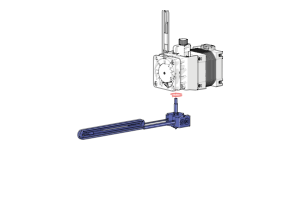
1. Unscrew the HotSide from the main body.
Ensure that the unit has completely cooled down to room temperature before attempting this. If you try this while still at temperature you will risk serious burns.
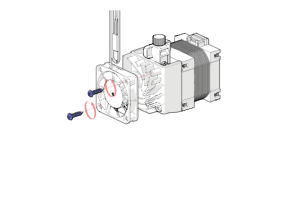
2. Undo the x2 self-tapping screws that fasten the fan and it should pull away from the heatsink.
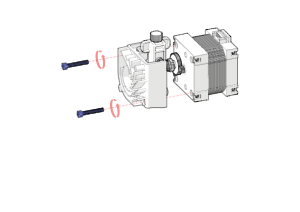
3. Remove the x2 M3 x 20 heatsink screws, this should allow the heatsink to be removed from the motor.
You will find it easier to complete this step with the idler tension set to it's lowest setting.
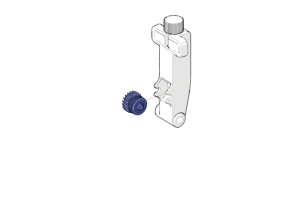
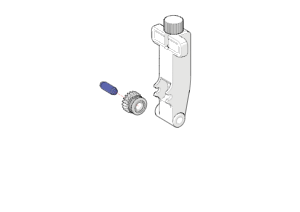
4. Pop the Idler Hobb out of the Idler, using an Allen key, or small screwdriver to provide a lever-action makes this easier.
Slide the pin out of the hobb gear.
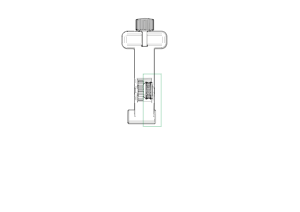
5. Slide the pin into the new idler gear.
Press the idler hobb back into the idler gear making sure that hobb section is on the same side as the short pin housing.
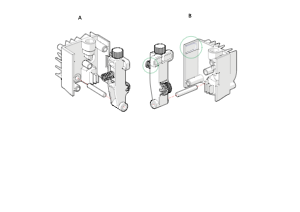
6. Slide the idler assembly back onto the dowel pin in the heatsink, if the dowel pin is in the motor side remove it and reinsert it into the sink.
Make sure to locate the spring in the channel highlighted in B.
Two views A and B are shown above, they represent the same step from two different viewing angles.
To make this step easier ensure the tension is set to it's the lowest setting otherwise you will be fighting against spring pressure unnecessarily.
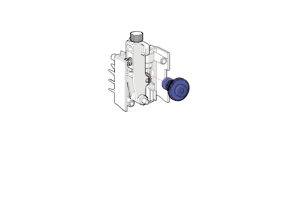
7. Insert the new drive gear into the sink, ensure the bearings are pressed onto the shaft. You may need to apply a little pressure on the idler arm to make sure the drive gear is seated correctly.
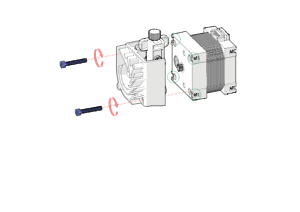
8. Reattach the heatsink and fasten the two M3 x 20 screws.
Make sure to check if the square nuts are still in place as you will have to undo the assembly later if one is missing at this stage.
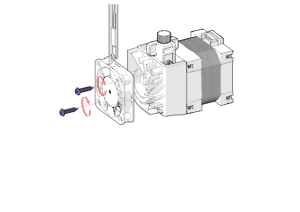
9. Reattach the fan using x2 self-tapping screws.
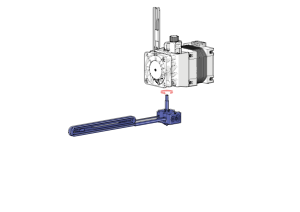
10. Reattach the HotSide.
Was this article helpful?
That’s Great!
Thank you for your feedback
Sorry! We couldn't be helpful
Thank you for your feedback
Feedback sent
We appreciate your effort and will try to fix the article