TABLE OF CONTENTS
Install Guide:
Written PDF:
- PDF - Installation Instructions for Bambu Lab X1C
- PDF - Installation Instructions for Bambu Lab P1P / P1S
Video Guide:
Change Nozzle Video:
- Nozzle Change: Use the provided torque limit knob when changing the nozzle, as it is preset to a 4 in-lb torque limit.
This is crucial to avoid deforming the hotend mounts.
PLA Printing Guidelines:
- Always keep the door open and the top cover propped up when printing with filaments that have a low glass transition temperature, like PLA, to minimise clog risks.
- The heated bed temperature should not exceed 55°C.
- Use either the Bambu Lab Cool Plate SuperTack or a compatible after market alternative such as DREMC Satin PEI.
- Keep the room temperature between 20C and 25C.
Slicer Setting:
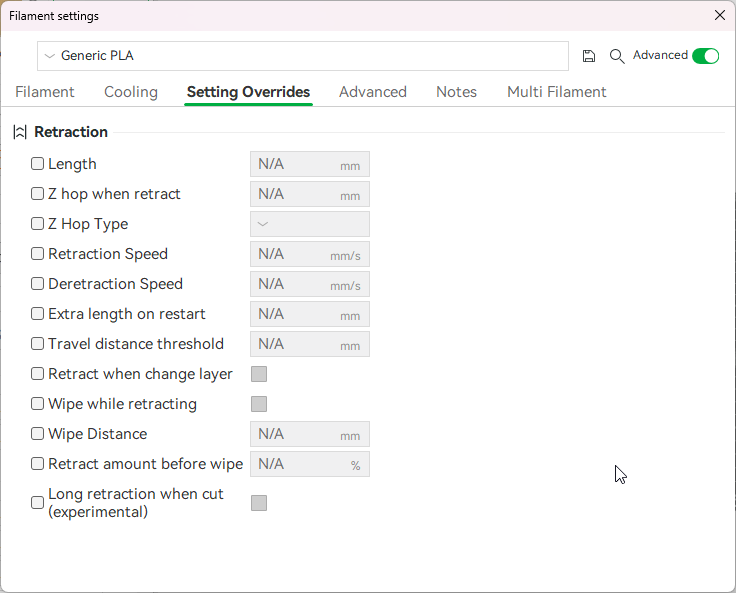
- Avoid using long retraction when cut
- The 'Disable Long Retraction' setting can be found under Filament Settings → Settings Overrides
- A long retraction can pull softened filament into the cutter, causing it to deform instead of being cleanly cut. This can lead to the filament getting stuck and potentially causing an AMS failure.
Was this article helpful?
That’s Great!
Thank you for your feedback
Sorry! We couldn't be helpful
Thank you for your feedback
Feedback sent
We appreciate your effort and will try to fix the article